Pronunciation Practice with Flashcards: Audio, Voices and an IPA Chart
Have you ever recognized an English word instantly on the page — thorough, comfortable, schedule, subtle, or choir — yet failed to catch it when a native speaker said it at natural speed, or hesitated before saying it out loud because you were unsure where the primary stress landed?
This gap between reading recognition and spoken fluency comes from silent flashcard habits. When you review vocabulary cards with your eyes alone, your brain still activates its internal voice (subvocalization) and invents a pronunciation based on spelling. In English, where spelling and phonetics constantly diverge, silent study reinforces "spelling pronunciations" day after day.
In this guide, we will walk through how Docki turns every flashcard review into active pronunciation and listening practice: from dual-layer audio on every vocabulary card (headword + example sentence), one-key replay shortcuts, and customizable voices in Settings, to reading passages aloud in Document and exploring our interactive 44-sound British English IPA chart with side-view mouth diagrams at /ipa.
1. Why Listening, Seeing, and Speaking Together Fixes Pronunciation
In cognitive psychology, Alan Baddeley's model of working memory explains that verbal information is rehearsed inside the phonological loop. Whenever you learn a new word without hearing its actual sound, your phonological loop guesses one from the letters on screen.
Consider how easily English spelling misleads learners:
- Silent consonants and syllable compression: Reading comfortable as four full syllables instead of
/ˈkʌmftəbl/, or pronouncing the silent b in subtle (/ˈsʌtl/) and the silent p in receipt (/rɪˈsiːt/). - Vowel quality traps: Confusing the short lax vowel
/ɪ/in ship with the long tense vowel/iː/in sheep, or misreading thorough (/ˈθʌrə/). - Shifting word stress: Pronouncing photograph (
/ˈfəʊtəɡrɑːf/), photographer (/fəˈtɒɡrəfə/), and photographic (/ˌfəʊtəˈɡræfɪk/) with identical stress.
When a flashcard combines real stock photography, IPA transcription, natural audio, and vocal shadowing, you align all three memory channels:
Attaching audio directly to your daily spaced repetition queue guarantees that you hear and repeat every target word dozens of times over its lifecycle.
2. Built-In Audio on Every Vocabulary Card: Word + Example Sentence
When you generate vocabulary flashcards in Docki, the system automatically finds and attaches real photos from stock photo libraries (Pexels, Pixabay, and Openverse) and equips the back of every card with two distinct audio tracks:
- Headword pronunciation audio: Placed right next to the target word and its IPA transcription, letting you hear exact vowel quality, consonant clusters, and primary stress.
- Contextual example sentence audio: Placed beside the example sentence, showing how the word behaves in connected speech — including weak forms, intonation, and linking.
 Figure 1: When you flip a vocabulary card in Review, look right next to the headword and its IPA transcription for the word-level speaker button.
Below the definition and photo, the example sentence section provides its own dedicated speaker icon:
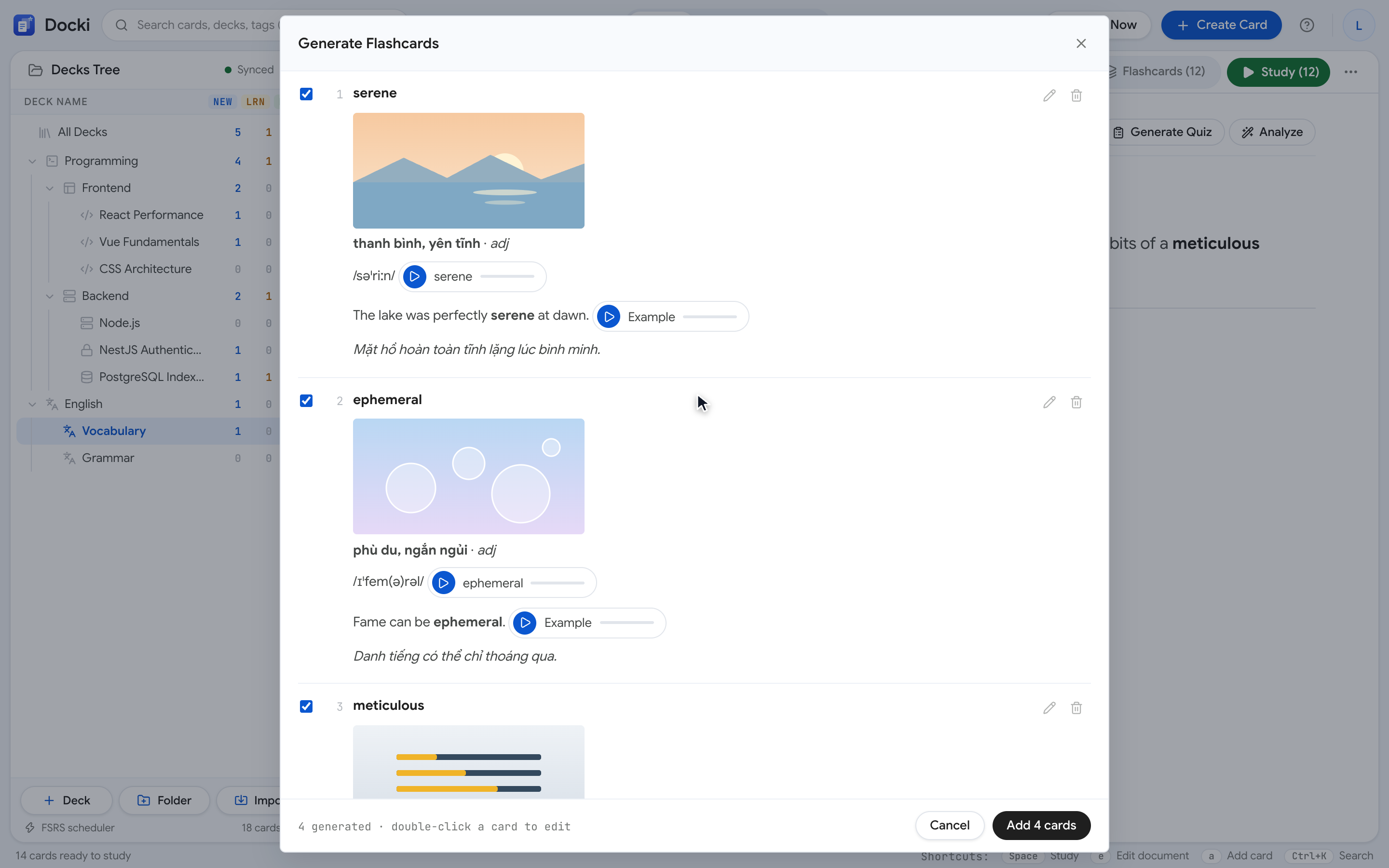 Figure 2: Click the speaker icon beside the example sentence to hear natural rhythm, stress, and linking in context.
🔊 Listen to Sample Word & Sentence Audio Right Here
Click any of the interactive audio chips below to hear how isolated word pronunciation pairs with natural sentence prosody in Docki:
| Target Word | IPA & Part of Speech | Word Audio | Contextual Example Sentence & Full Sentence Audio |
|---|---|---|---|
| rain | /reɪn/ · noun | rain | "I forgot my umbrella, so I got wet in the rain." Câu ví dụ rain |
| cloudy | /ˈklaʊdi/ · adjective | cloudy | "It is cloudy today, so we should take an umbrella." Câu ví dụ cloudy |
| windy | /ˈwɪndi/ · adjective | windy | "It is very windy today, so hold on to your hat." Câu ví dụ windy |
| sunny | /ˈsʌni/ · adjective | sunny | "It is a sunny day, so let's go to the beach." Câu ví dụ sunny |
3. Autoplay on Flip and One-Key Audio Shortcuts
In any deck's Deck settings dialog, you can toggle whether card audio plays automatically the moment you reveal the back of a card:
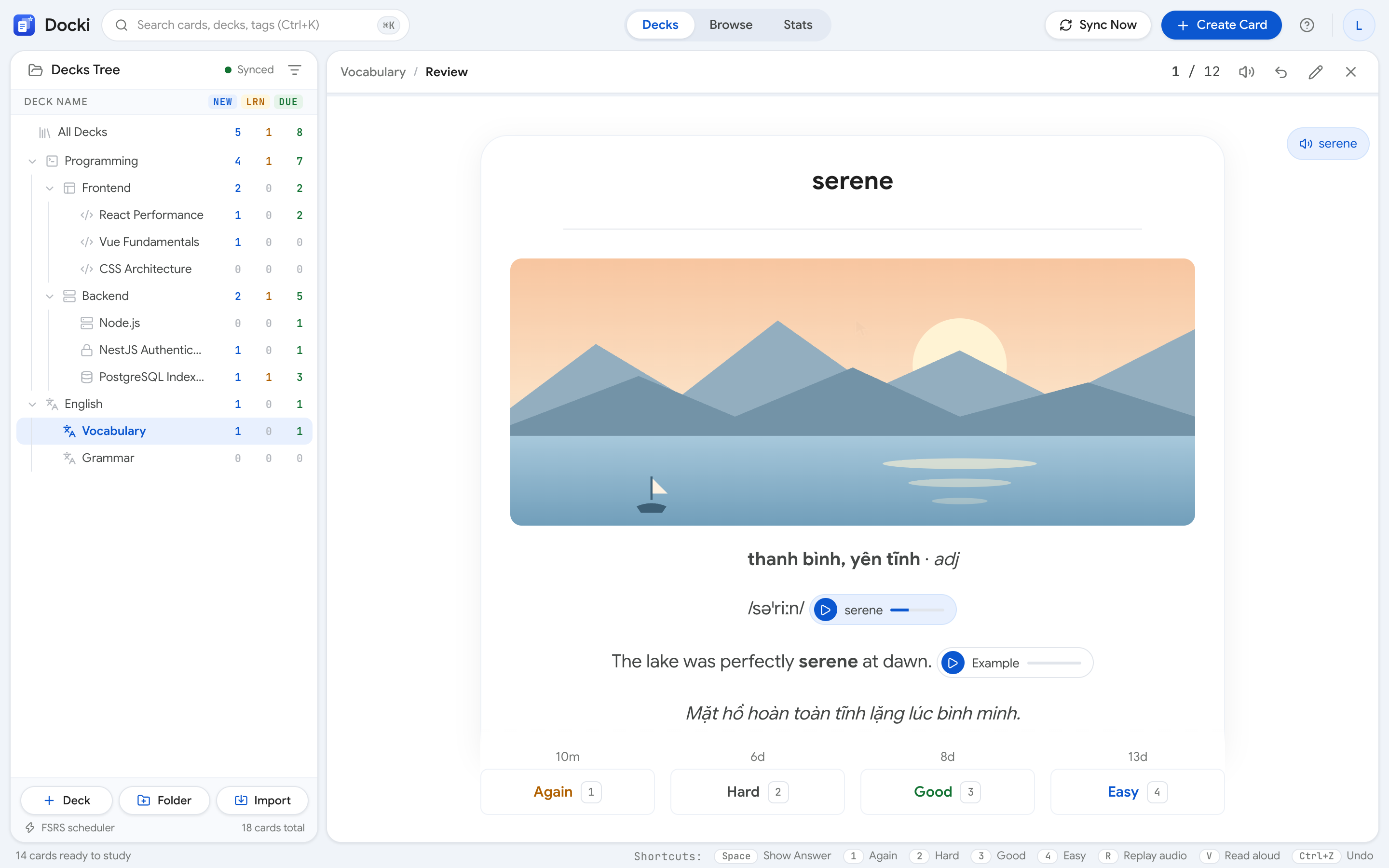 Figure 3: Open Deck settings to turn automatic audio playback on or off when flipping cards in that deck.
When autoplay is enabled, flipping a card with Show Answer (or Space) immediately plays the headword audio followed by the example sentence audio. Keep your hands on the keyboard during review with these shortcuts:
| Shortcut | Action in Review | Best Used When... |
|---|---|---|
R | Replay the card's audio: Replays word + sentence audio | You want to hear the stress pattern again and shadow the speaker out loud. |
V | Read aloud: Reads selected text or the visible card side aloud; press V again to pause/resume | You are reviewing a knowledge card and want to listen to the explanation. |
← / → | Jumps to the previous/next sentence during Read aloud | You want to repeat one specific sentence inside a card or note. |
Esc | Stops Read aloud playback immediately | You are ready to move on to the next card. |
4. Regenerating Audio with a Different Voice or Fresh Example Sentence
Hearing a difficult word spoken by different voices helps your ear generalize. And if you have reviewed a card so many times that you memorize the sentence's opening words rather than recalling the target word, you can refresh either element inside the card editor (press E during review):
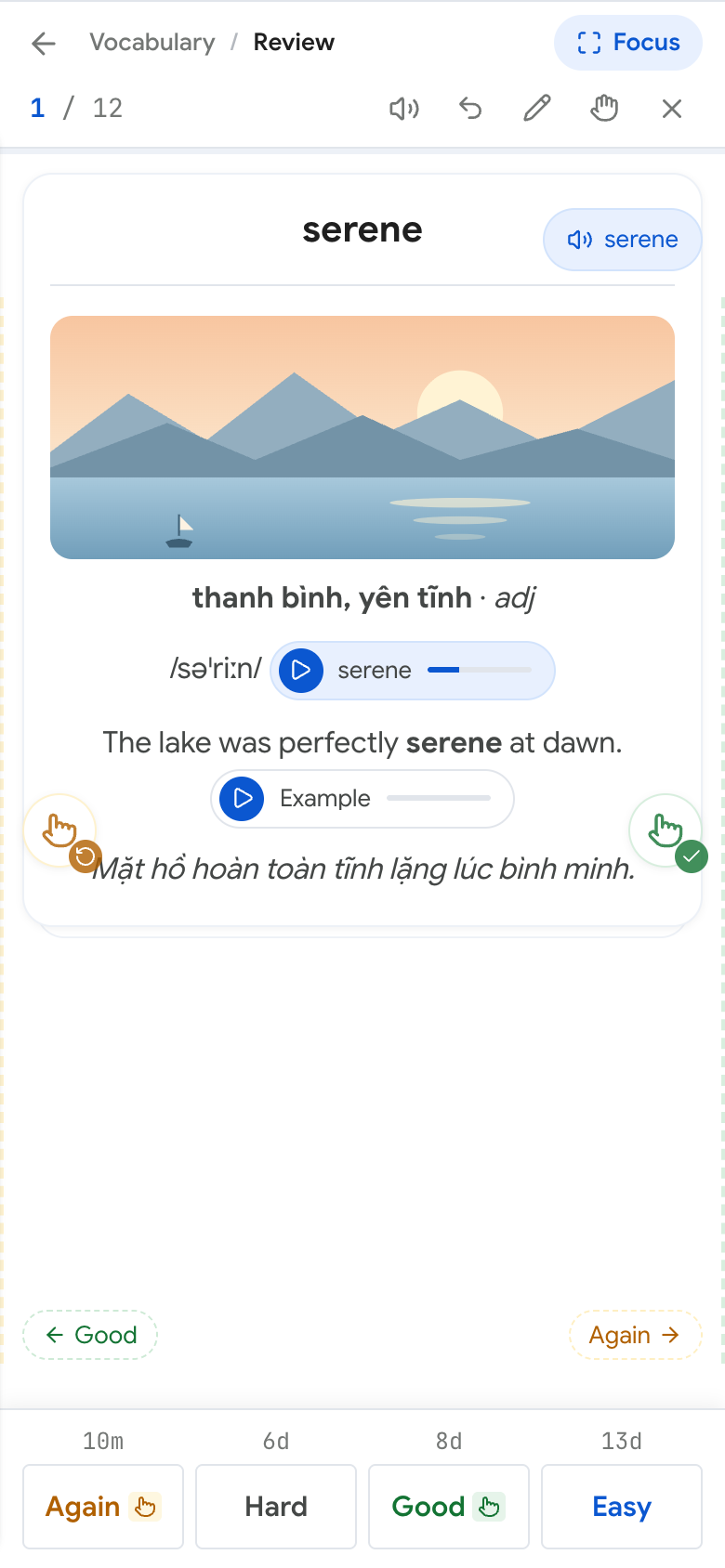 Figure 4: Press E during review to regenerate the card's audio in another voice or create a fresh example sentence.
- Regenerate audio in a new voice: Pick another natural voice and replace the card's word and sentence audio.
- Generate a new example sentence: Request a fresh contextual sentence (with updated audio) to keep active recall genuine.
5. Choosing Your Preferred Voices and Speed in /settings/voices
Go to Settings → Read aloud and click Configure voices (or visit /settings/voices):
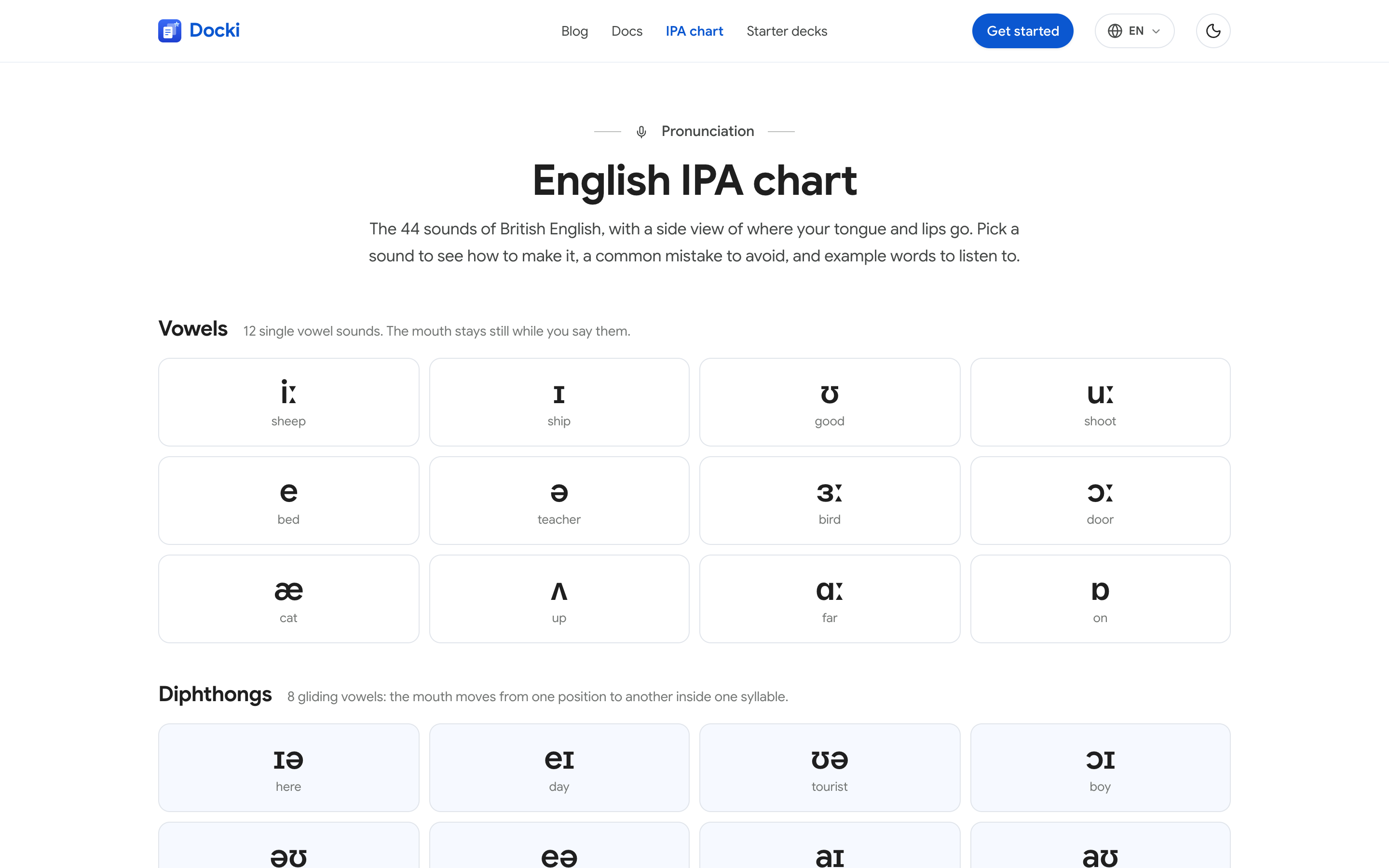 Figure 5: In /settings/voices, choose your preferred Google voice per language, preview samples, and set playback speed.
- Per-language voice selection: Choose your preferred voice for English, Vietnamese, Japanese, Chinese, Korean, French, German, and Spanish.
- Playback speed control: Slow playback down for unfamiliar consonant clusters, or speed it up for listening drills.
- Automatic mixed-language splitting: When a card mixes two languages, Docki reads each segment with its matching voice.
6. Listening to Passages in Your Notes with Read Aloud
Inside any deck's Document tab, highlight a paragraph and click Read aloud from the selection toolbar (or press V):
Why does recalling help you remember?
Rereading a page feels productive, but mostly it just makes the page familiar. Retrieval practice — pulling information back without looking — forces the brain to rebuild the path to the memory, and each rebuild makes the next one easier.
When you try to recall, the brain has to search for and reconnect pieces of information. That effort is the exercise: the connection gets stronger each time, so next time you remember faster and keep it longer.
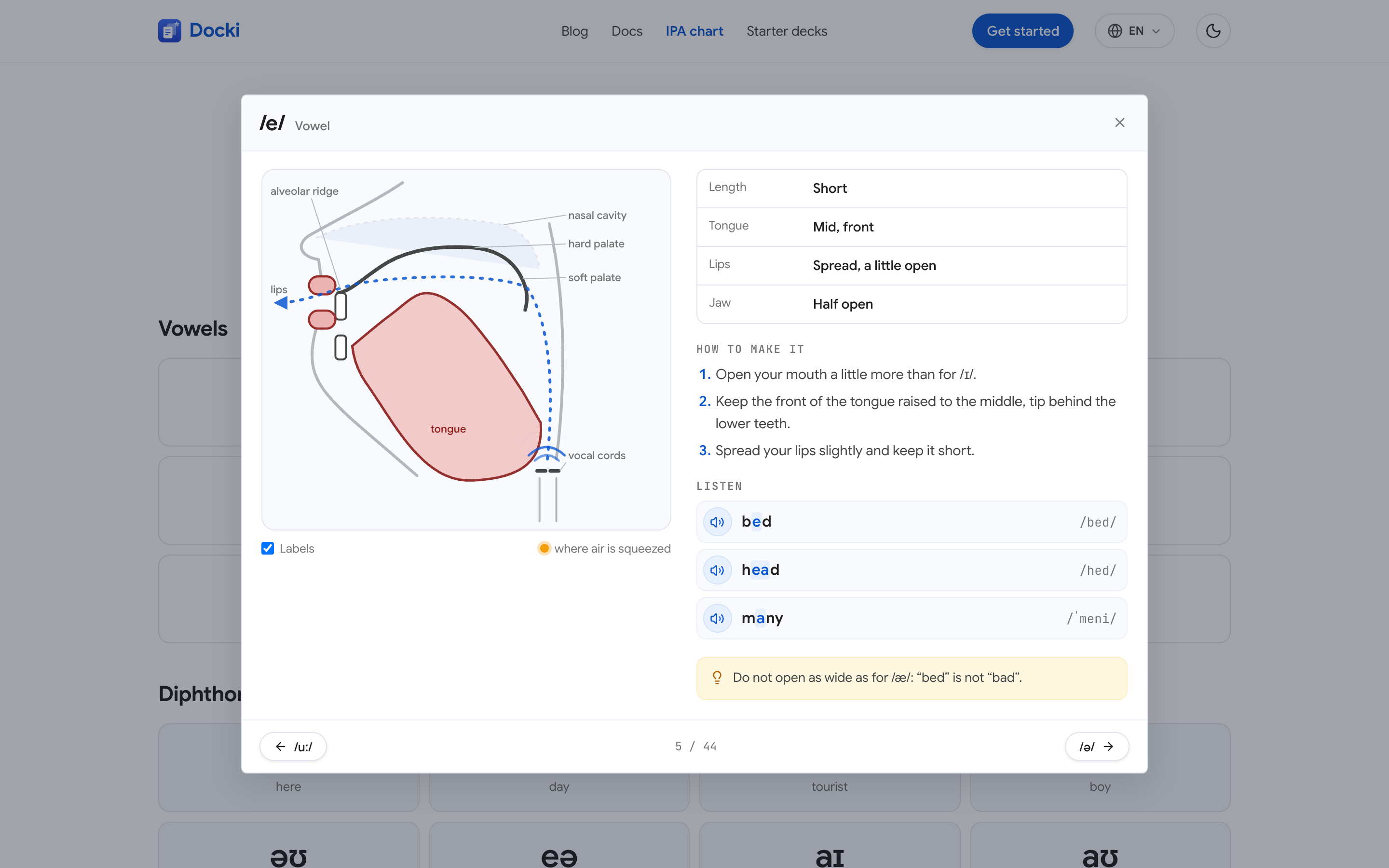 Figure 6: Highlight any passage inside a Document and click Read aloud to listen while each sentence is highlighted in real time.
Docki splits long passages at sentence boundaries so playback starts right away while upcoming sentences prefetch in the background. Click or tap any line to jump playback directly there.
7. Mastering the 44 Sounds of English with the Interactive /ipa Chart
If a phoneme does not exist in your native language — such as /θ/ (think), /ð/ (this), or the contrast between /ɪ/ (sit) and /iː/ (seat) — your ear alone cannot tell you where to place your tongue. Docki includes a public, interactive 44-sound British English IPA Chart at /ipa:
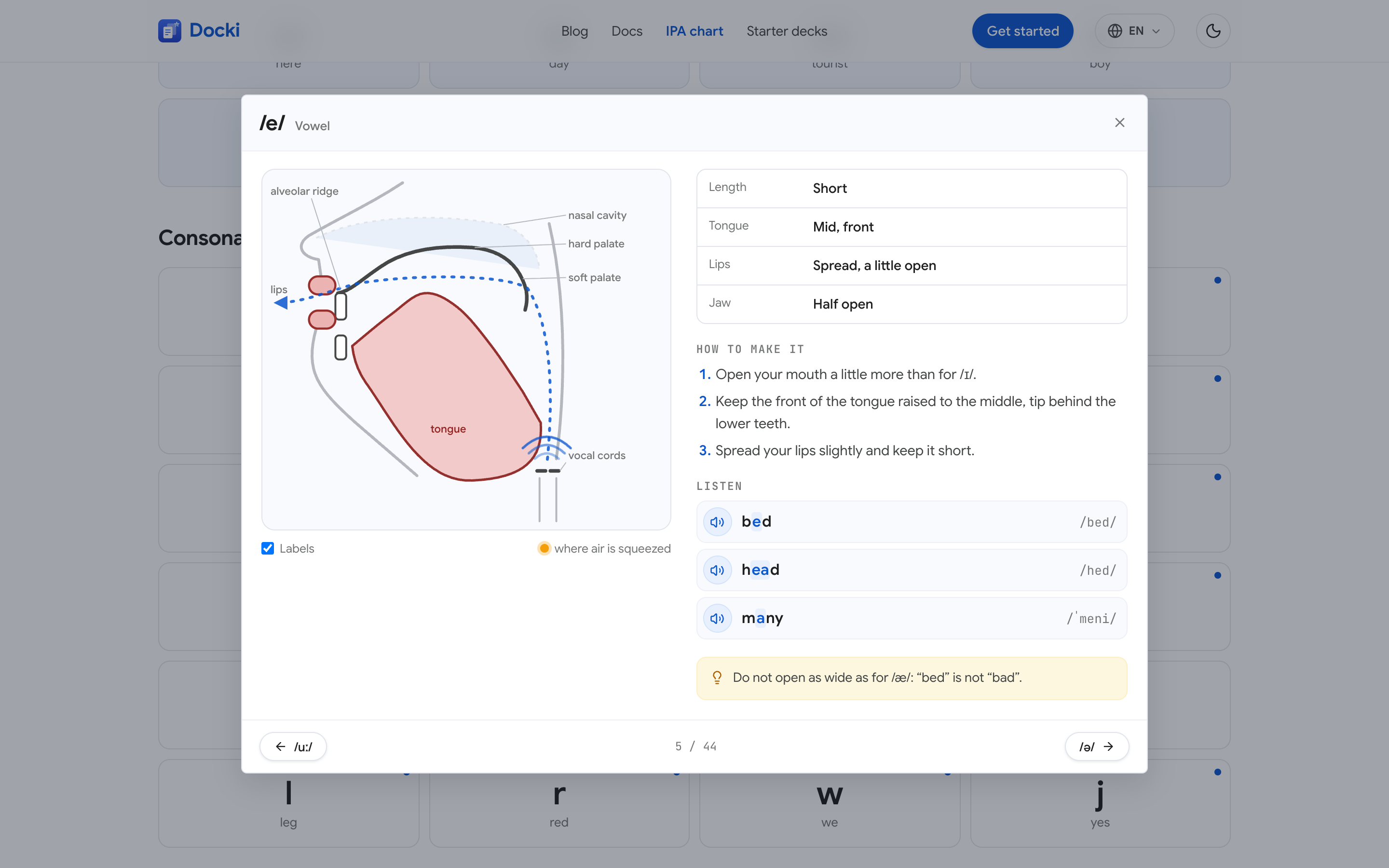 Figure 7: The public /ipa page lays out all 44 British English phonemes across Vowels, Diphthongs, and Consonants.
Click any sound tile on /ipa (and use ← / → to step through all 44 phonemes) to open a detailed articulatory guide:
 Figure 8: Clicking any phoneme tile opens a side-view mouth diagram, articulation steps, pitfalls, and clickable example words.
- Sagittal Mouth Diagram: Shows lips, teeth, tongue tip/body, hard palate, and soft palate, plus airflow type.
- Animated Diphthong Glides (Start · Glide · End): Animates smoothly from the starting vowel posture to the ending target.
- Step-by-Step Articulation & Tip Box: Plain-language steps and common learner mistakes.
- Playable Example Words: Common words with highlighted spelling, full IPA transcriptions, and instant audio.
8. How Google Voices and Browser Voices Work Together
In Settings → Read aloud, Docki pairs two speech sources:
- Google Voice (Server TTS): Natural neural speech across every device. Both Free and Pro accounts include a monthly character allowance (resets on the 1st). Because Docki caches audio, replaying a card or passage you have already listened to is free and never consumes your allowance.
- Browser Voice (Web Speech API): Free and unlimited. If you prefer browser voices, are not signed in, or finish your monthly Google voice allowance, Docki automatically uses the best voice on your device.
9. Real-World Walkthrough: Fixing 5 Tricky English Words in 10 Minutes
Here is how a learner fixes five frequently mispronounced words — thorough (/ˈθʌrə/), comfortable (/ˈkʌmftəbl/), schedule (/ˈʃedjuːl/), subtle (/ˈsʌtl/), and determined (/dɪˈtɜːmɪnd/):
- Create the cards (2 min): Add the five words to a vocabulary deck with automatic IPA, real stock photos, and dual audio.
- Check mouth posture on
/ipa(3 min): Open /ipa and click/θ/and/ɜː/to check tongue placement. - Shadow during review (3 min): Flip each card, press
Rto replay, and repeat the full sentence out loud. - Grade honestly (2 min): If you spell subtle right but still pronounce the silent b, press Again or Hard.
Voice Study (speaking answers into your microphone for AI grading) is built for knowledge decks only — not vocabulary decks. For vocabulary decks, combine card audio, /ipa, vocal shadowing, and typed answers. Read more in Voice Study: Practice Knowledge Flashcards Out Loud.
10. Tips and Common Mistakes to Avoid
- Never review audio cards silently: Say every word and example sentence out loud at least once per review.
- Anchor your eyes on the IPA, not the spelling: Look directly at
/…/while pressingR. - Grade yourself on pronunciation too: Press Hard if you stumbled over primary stress.
- Shadow the full sentence: Sentence shadowing trains natural rhythm and word linking.
11. Frequently Asked Questions (FAQ)
Can I turn off automatic audio playback in public?
Yes. Open Deck settings and switch off Autoplay. You can still play audio on demand with R.
Which English accent does the /ipa chart use?
The chart at /ipa uses British English phonemic transcriptions with mouth diagrams. In /settings/voices, you can choose your preferred voice for cards and Read aloud.
Does pressing R to replay use up my monthly Google voice allowance?
No. Cached audio replays for free without using your monthly allowance.
12. Start Practicing Pronunciation on Every Card Flip
Put this method to work in your own studying
Create study documents, extract flashcards with AI and review with FSRS spaced repetition on Docki, completely free.
Start for free