Spaced Repetition in Practice: When to Press Again, Hard, Good or Easy
Almost every learner who discovers spaced repetition flashcards experiences the same initial high: you download an app, create or import hundreds of cards, and breeze through 80 new flashcards a day during week one.
Then week two hits.
Suddenly, your Due queue explodes to 350 cards. What used to be a crisp 10-minute session morphs into a grueling 60-minute slog. Your finger hovers nervously over the rating buttons, your eyes glaze over, and after missing two consecutive days, the backlog snowballs into an impossible mountain. Demoralized, you abandon the deck entirely and conclude that flashcards "just don't work for your brain."
The truth is that more than 80% of spaced repetition dropouts do not fail because of weak willpower or poor memory. They fail because of daily operational mistakes: adding too many new cards too fast, guessing wildly at the rating buttons, treating review sessions like passive cramming, and never configuring daily pacing limits.
Docki's integrated FSRS (Free Spaced Repetition Scheduler) engine optimizes your review schedule mathematically, trimming up to 30% of unnecessary review overhead compared to legacy Anki SM-2 algorithms. However, an algorithm is only as sharp as the feedback you feed it.
In this hands-on guide, we will walk through the exact daily review workflow in Docki: how to decipher the Today queues, when to press each of the four rating buttons, how to read interval previews, how to leverage keyboard shortcuts and mobile gestures, and how to calibrate daily limits to keep your study sessions sustainable at 15 to 20 minutes a day.
1. The Core Principle: Timing Beats Volume
To master the rating buttons, we must first understand why spaced repetition works in human cognition.
In the late 19th century, psychologist Hermann Ebbinghaus mapped out the human Forgetting Curve. Without active reinforcement, newly acquired knowledge decays exponentially: within 24 to 48 hours, up to 70% of what you read or studied vanishes from conscious memory.
Cramming tries to fight this decay by re-reading the same material five times in one sitting. But cognitive science has repeatedly shown that passive repetition yields shallow, short-lived retention. In their landmark 2006 study published in Psychological Science, cognitive psychologists Henry L. Roediger III and Jeffrey D. Karpicke proved that active testing produces dramatically stronger long-term retention than repeated study, even when learners feel less confident during practice. This phenomenon — known as the testing effect — occurs because effortful retrieval triggers neurobiological consolidation, strengthening the synaptic pathways (long-term potentiation) that encode memory traces.
Spaced repetition takes full advantage of this mechanism: it prompts you to retrieve the memory at the exact moment it is on the verge of slipping away — a state psychologists term desirable difficulty. If you review a card too early while it is still fresh, retrieval requires zero effort, providing little neural benefit. If you review it too late, the memory has evaporated, forcing you to relearn from scratch. Each timely, successful retrieval flattens your forgetting curve, extending the time until the next review from 1 day, to 3 days, 10 days, a month, and eventually years.
Try the interactive spacing model below to see how intervals expand over successive reviews:
Each dot is a review: memory returns to full and then fades more slowly than before. Gaps between reviews widen as you remember well. (Illustration.)
While legacy flashcard apps rely on the rigid 1987 SM-2 formula (which punishes learners with permanent "Ease Hell" whenever they press Hard), Docki runs on FSRS. FSRS models your memory through three distinct cognitive variables (DSR):
- Difficulty (, scale 1–10): How inherently complex the item is for you personally.
- Stability (, in days): How long the memory trace remains accessible before recall probability drops to your target threshold (default 90%). For example, if , you have a 90% chance of recalling the card after 30 days.
- Retrievability (, probability 0–100%): Your real-time chance of successfully recalling the card after days have passed since the previous review.
If you want to explore the mathematical proofs and benchmark comparisons between FSRS and SM-2, read our comprehensive companion article: What Is the FSRS Algorithm and Why Does It Beat SM-2?. In this guide, our focus is 100% practical.
2. Navigating the Today Dashboard: Your Morning Cockpit
Every study session in Docki begins at the Today dashboard (/). This screen acts as your command center, breaking down your immediate study obligations across every deck and folder.
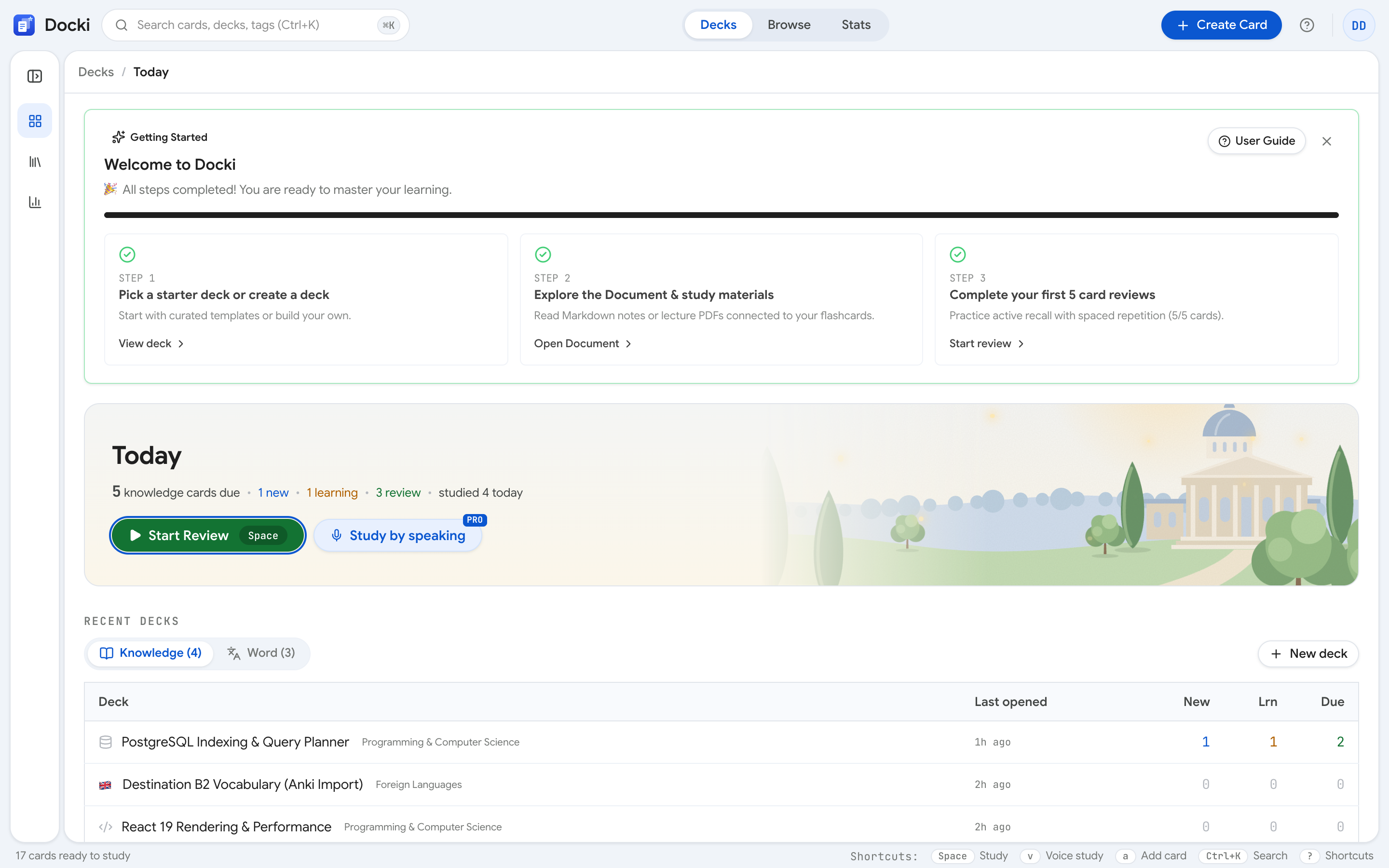 Figure 1: The Today screen displays your decks with three color-coded queues: New (blue), Learning (orange), and Due (red).
Across each deck card or folder row, you will see three distinct badges:
Deciphering the Three Queues
- New (Blue badge): Cards you have generated from Documents with AI, created manually, or imported from Anki (
.apkg) that have never been reviewed before. New cards have no historical stability or difficulty ratings. - Learning (Orange badge): Cards currently in their short intra-day learning steps (such as cards you just failed with Again, or cards going through their initial 10-minute check). These will reappear before your session ends.
- Due (Red badge): Mature cards whose scheduled interval has elapsed according to FSRS calculations. This is your highest-priority queue. If you let Due cards accumulate, forgetting rates rise sharply.
Starting a Focused Session
Clicking the prominent Start Review button (or hitting Space / S) launches an optimized study flow. Docki prioritizes your queue intelligently:
- Due cards are served first to rescue fading memories.
- Intra-day Learning steps cycle in seamlessly when their countdown timers expire.
- New cards appear in controlled batches according to your daily limits.
You can also use the arrow keys ↑ ↓ ← → to browse decks in the tree view and press Enter to start studying a specific deck or folder.
Like Anki, Docki resets its daily review counters at 4:00 AM local time rather than midnight. If your schedule has you studying late into the night at 11:30 PM, your session will not be abruptly split in half when the clock strikes midnight.
3. The Four Rating Buttons: Again, Hard, Good, or Easy?
Once you formulate your answer and click Show Answer (or hit Space), the back of the card reveals the solution along with four FSRS rating buttons: Again, Hard, Good, and Easy.
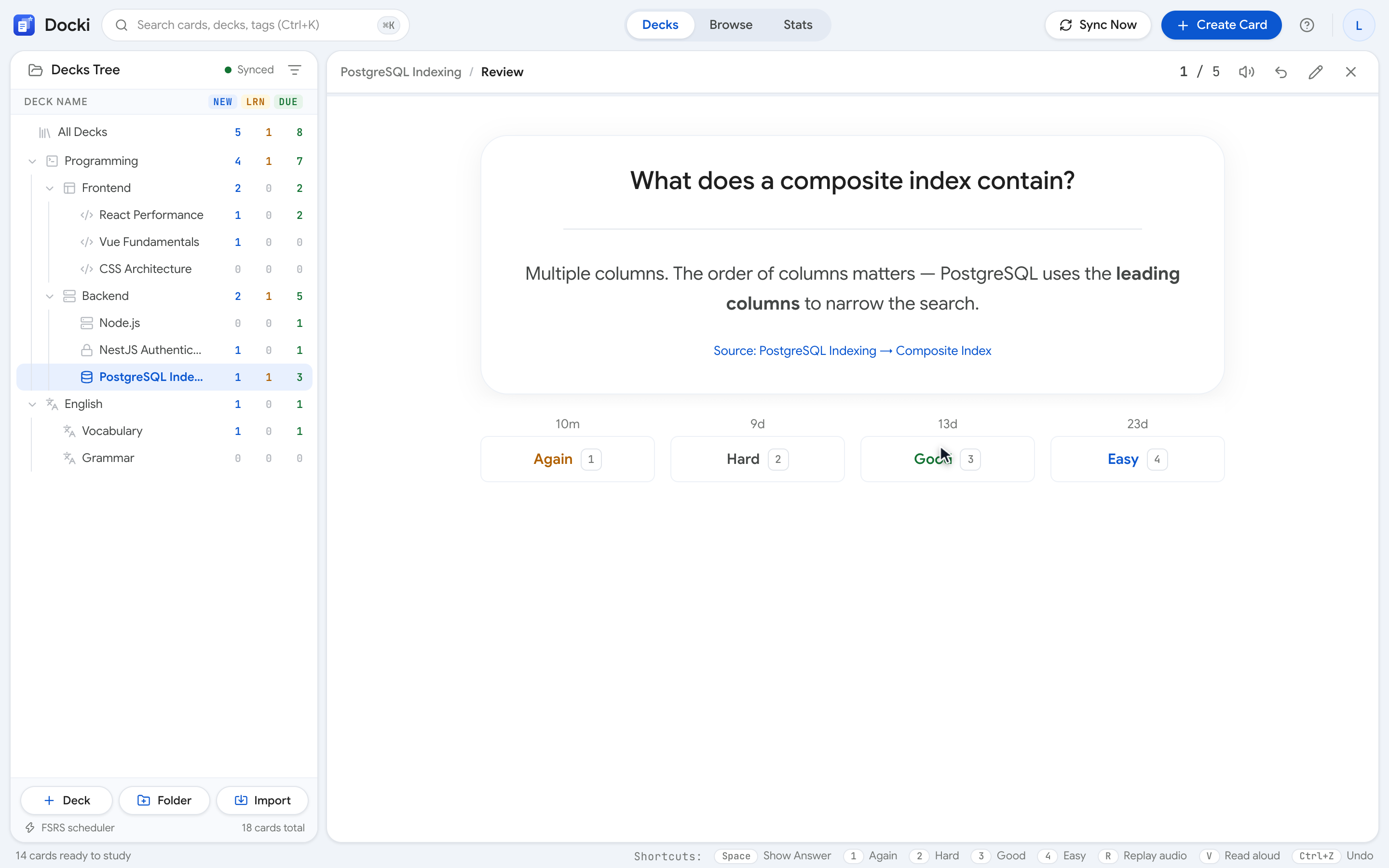 Figure 2: The revealed card back displays the answer and the four rating buttons with estimated next intervals beneath each label.
Choosing the right button determines the mathematical trajectory of that card. Here is the exact decision rulebook:
1. Again (Key 1) — Complete Blank or Fundamental Error
Press Again when:
- Your mind went completely blank, and you could not retrieve the core answer after 5 to 10 seconds of genuine effort.
- You produced an answer that was fundamentally incorrect or conflated with a different concept.
- You experienced the classic recognition trap: you had no idea on the front, but after flipping you said, "Oh yeah, I knew that!" (Recognition is not recall).
How FSRS Responds: The card is placed into Relearning. Its stability () drops back to short intra-day steps (<1m or 10m), and it will reappear later in today's session. Its difficulty () increases so future intervals expand more conservatively.
2. Hard (Key 2) — Correct, but a Painful Struggle
Press Hard when:
- You recalled the correct answer, but it took more than 5 to 10 seconds of intense mental straining.
- You needed to hit
Hto view the Hint before you could unlock the answer. - You remembered the primary concept but missed a minor secondary detail.
How FSRS Responds: The card passes, but its next interval increases very modestly (e.g., from 3 days to 4 days rather than jumping to 8 days). FSRS increases the card's difficulty rating () to ensure you see it more frequently in upcoming cycles. Unlike SM-2, pressing Hard in FSRS does not permanently destroy your card's ease factor.
3. Good (Key 3) — The Default Choice for 80% of Reviews
Press Good when:
- You recalled the answer accurately after a normal, healthy pause (2 to 5 seconds).
- You stated or typed the solution without checking hints or hesitating excessively.
How FSRS Responds: This is the standard benchmark. FSRS computes the mathematically optimal interval expansion based on current stability to preserve a 90% probability of recall at your next due date.
4. Easy (Key 4) — Instantaneous, Trivial Recall
Press Easy when:
- The answer came to mind in under one second with zero hesitation.
- The item is already second nature or directly reinforced by your daily work.
How FSRS Responds: FSRS awards a major interval multiplier (e.g., jumping from 4 days straight to 3 weeks) and lowers the card's difficulty score ().
Anki SM-2 vs. Docki FSRS: How the Buttons Behave
If you have used Anki before, you know that grading cards in traditional software feels fraught with anxiety. Here is how FSRS fundamentally changes the game:
| Button | Anki SM-2 Behavior (Legacy) | Docki FSRS Behavior (Modern) |
|---|---|---|
| Again (1) | Resets card interval to 1 day; slashes Ease Factor by 20 percentage points | Resets stability to intra-day step; increases difficulty ; recalculates future trajectory without permanent penalty |
| Hard (2) | Multiplies interval by 1.2; slashes Ease Factor by 15 percentage points (triggers "Ease Hell") | Expands interval conservatively; raises difficulty ; card recovers full stability upon subsequent Good ratings |
| Good (3) | Multiplies interval by static Ease Factor (default 2.5) | Calculates mathematically optimal interval expansion based on true memory stability and desired retention |
| Easy (4) | Adds arbitrary bonus to interval; raises Ease Factor by 15 points | Substantially increases stability and lowers difficulty based on real-world forgetting curve dynamics |
This fundamental algorithmic distinction means you no longer need to fear the Hard button in Docki. In Anki, hitting Hard three times would permanently ruin a card's scheduling factor, trapping it in short cycles for months. In Docki, FSRS treats difficulty and stability as separate dimensions: difficulty reflects the inherent complexity of the concept, while stability reflects the durability of your memory trace.
A Concrete Walkthrough: A System Design Card
To make the four buttons crystal clear, consider this real-world flashcard from a Database Architecture deck:
Front: "What is the core working principle of a B-Tree index in a relational database?"
Back: "A B-Tree is a self-balancing search tree maintaining sorted data with logarithmic lookup, insertion, and deletion (). Leaf nodes are linked in a doubly linked list to provide ultra-fast sequential range scans."
- Press Again if: You confused B-Tree with a binary search tree or thought it was a Hash index, completely forgetting the self-balancing multi-way structure.
- Press Hard if: You took 12 seconds to formulate your answer, remembered logarithmic complexity, but had to hit
Hfor a hint to remember that leaf nodes are linked for range scans. - Press Good if: You paused for 3 seconds, thought through the core concepts (self-balancing, , linked leaves for range scans), flipped the card, and confirmed you had it right.
- Press Easy if: You are a senior database engineer who designs indexing strategies every week and can recite the architecture in your sleep.
Reading Interval Previews
Look closely beneath each button in Figure 2 and Figure 3. Docki prints the exact scheduled interval right below the label:
<1mor10m: The card will repeat within minutes during the current session.1d,3d,6d: The card is scheduled for tomorrow, 3 days, or 6 days from now.1.5mo,1y: The card has reached high stability and will return in months or a year.
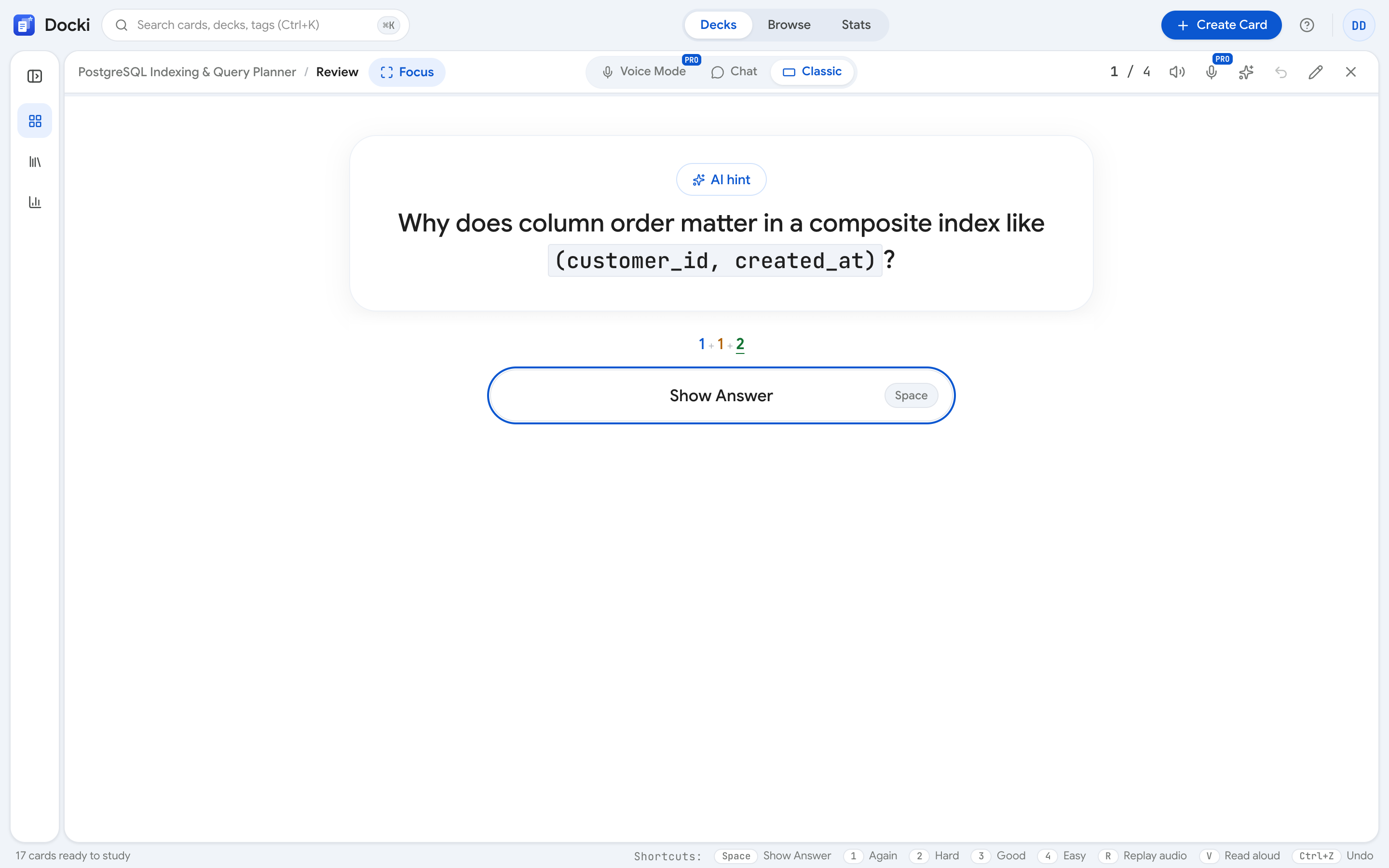 Figure 3: Review interface in Docki showing card scheduling options and interval previews.
The Golden Rule: Honest Grading
- Never shy away from Again: Learners often treat pressing Again as a personal defeat, choosing Hard instead to feel productive. But rating a forgotten card Hard tells FSRS you remembered it, scheduling it days into the future where you will inevitably fail it again. Again is not a punishment — it is the essential corrective signal that keeps your memory intact.
- Do not abuse Easy: Using Easy just to clear cards off your screen leads to interval inflation. Within a month, those cards will re-emerge completely forgotten. Keep
Goodas your standard default.
Test your active recall instincts using the interactive widget below:
Why do nerve impulses travel fast along myelinated fibres?
4. Speed & Flow: Keyboard Shortcuts and Mobile Gestures
Flipping through 80 cards with a mouse is slow and tedious. Docki includes a comprehensive set of keyboard shortcuts and mobile touch gestures designed for rapid-fire review sessions.
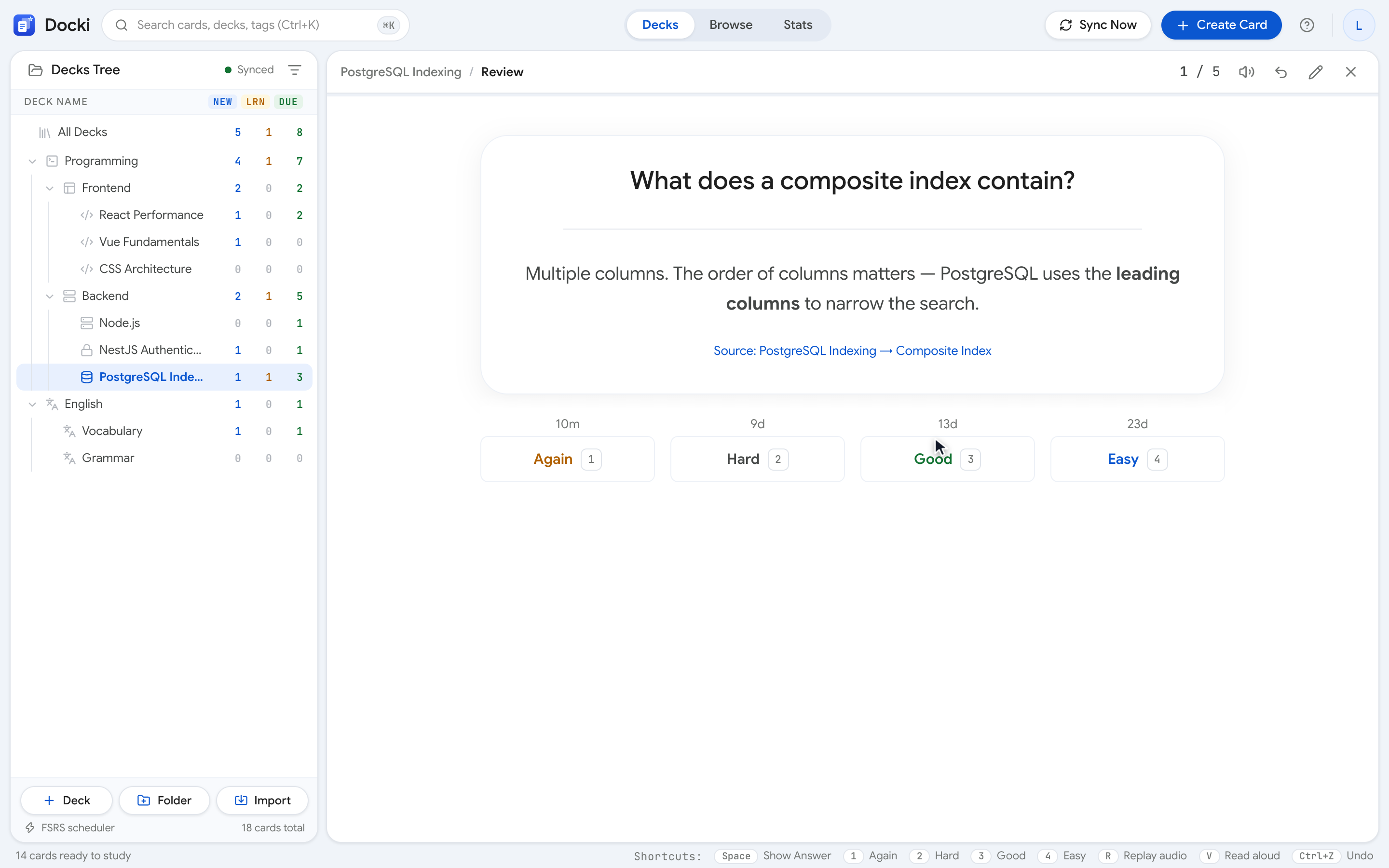 Figure 4: The Shortcuts & Gestures dialog (? key) provides a quick reference for keyboard hotkeys and mobile touch actions.
Essential Desktop Hotkeys
Space/Enter: Reveal the answer from the front. Once revealed, pressingSpaceagain selects Good (3). This allows you to fly through familiar cards with a single thumb tap.1,2,3,4: Instantly grades Again, Hard, Good, and Easy.Ctrl+Z(orCmd+Zon Mac): Undo last rating. If you accidentally tap Easy instead of Again, hitCtrl+Zimmediately to restore the card and re-grade it cleanly.E: Edit card in place. If you notice a typo or want to refine a vague question, hitEto open the markdown editor without leaving your review queue.H: Toggle card Hint.R: Replay attached audio pronunciation.?: Open the Shortcuts modal dialog at any time.
Mobile Touch Gestures
When studying on iOS or Android browsers:
- Swipe Left or Double-tap Right: Reveal answer, then grade Good.
- Swipe Right or Double-tap Left: Grade Again.
- A prominent Undo button in the review header lets you revert unintended swipes on touchscreens with zero friction.
5. Setting Sustainable Daily Limits and Learn-Ahead
The number one reason beginners burn out is leaving daily new cards uncapped. If you generate 200 vocabulary cards from a chapter and study them all on Monday, you are setting a trap for your future self.
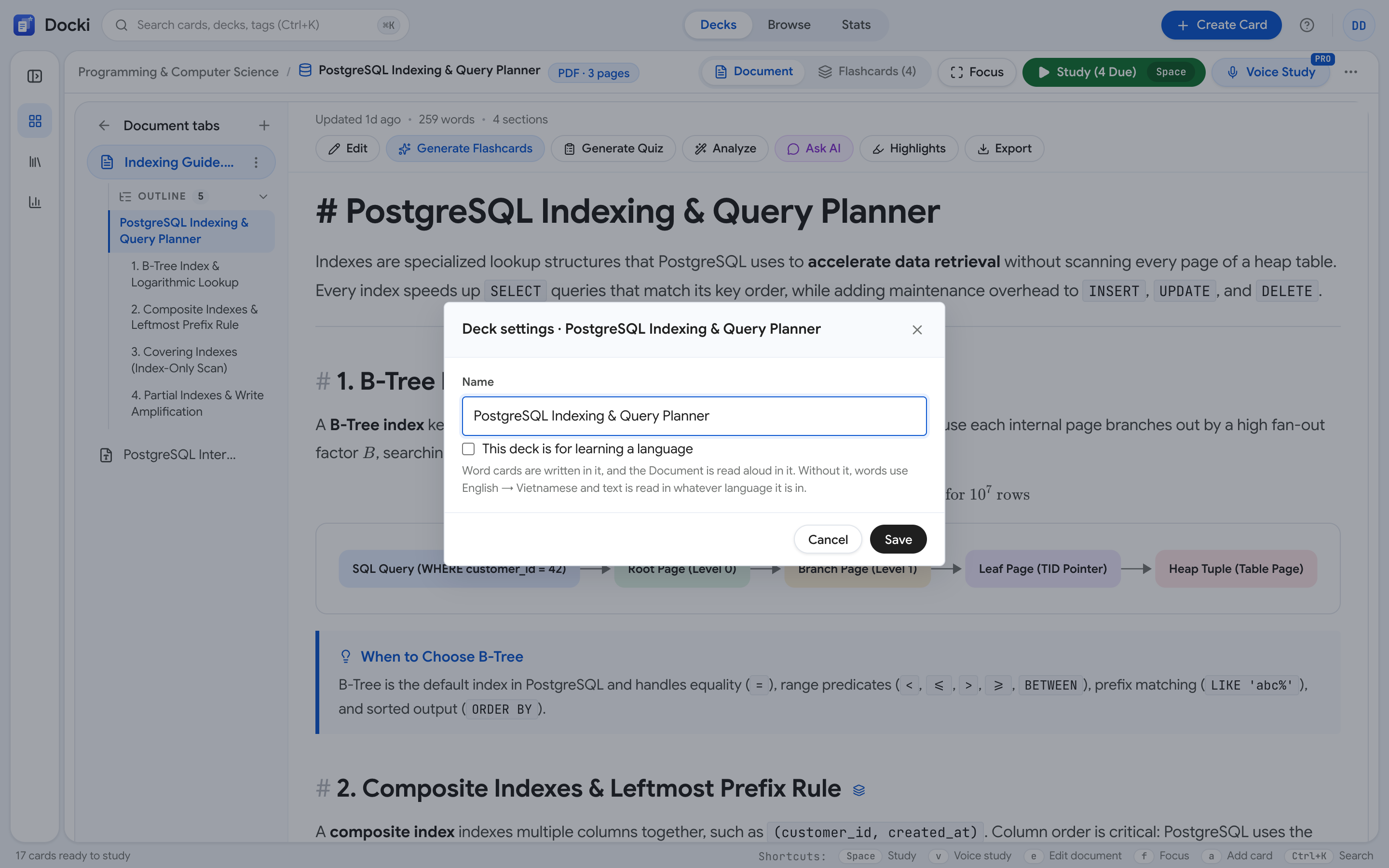 Figure 5: Deck Settings modal (?deck-settings= or /settings) for configuring daily limits and FSRS target retention.
Two Vital Safety Valves
In Deck Settings (or global Settings at /settings), you can adjust:
- New cards per day (
newPerDay): Caps how many virgin cards enter your queue each day. Docki defaults to unlimited (null). - Maximum reviews per day (
maxReviewsPerDay): Sets a hard ceiling on daily review volume, preventing backlog panic if you return after a busy weekend.
The Long-Term Review Workload Equation
In spaced repetition science, your long-term daily review load stabilizes around a predictable multiplier:
| Study Pace | New Cards / Day | Stable Daily Due Cards | Daily Time Investment | Sustainability Profile |
|---|---|---|---|---|
| Light & Steady | 10 cards | 60 – 100 cards | 8 – 12 minutes | Ultra-sustainable, near-zero burnout risk |
| Sweet Spot (Recommended) | 20 cards | 120 – 180 cards | 15 – 20 minutes | Optimal for professionals & students |
| Intensive (Exam in 30 days) | 35 cards | 220 – 320 cards | 30 – 40 minutes | Demands strict daily discipline |
| The Burnout Trap | 60+ cards | 400 – 600+ cards | 60+ minutes | 90% abandonment rate within two weeks |
If you are just starting out, set newPerDay = 15 or 20. Maintain this pace for two weeks until your daily Due workload plateaus into a comfortable 15-minute groove before considering an increase.
The 20-Minute Learn-Ahead Window
In Docki's scheduler (lib/srs.ts), the parameter LEARN_AHEAD_MS is set to 20 minutes.
When you fail a card with Again, its next step is set to 10 minutes. If you finish your due review cards and only have learning cards waiting for their 10-minute countdown, Docki's learn-ahead feature presents them early instead of forcing you to twiddle your thumbs for 8 minutes. You can finish your entire session cleanly in one sitting.
6. Target Retention (90% Default): The Workload Trade-off
Inside your settings, you will find the Desired Retention slider (retention), set to 0.90 (90%) by default.
This number represents FSRS's target recall probability when a card falls due: on any given day, you should remember approximately 90% of your cards and miss about 10%.
The Mathematical Trade-Off
Why not aim for 99% retention?
Memory consolidation follows an asymptotic curve of diminishing returns:
- Increasing Retention from 90% to 97%: You gain 7% more recall accuracy, but your required review frequency more than doubles. You spend twice as much time studying for marginal retention gains.
- Decreasing Retention from 90% to 85%: Your daily review volume drops by roughly 30%. This is great for casual vocabulary exploration or secondary subjects where missing an occasional card carries low stakes.
| Target Retention | Relative Review Workload | Acceptable Forgetting Rate | Best Use Case |
|---|---|---|---|
| 80% – 85% | 35% lighter workload | 15% – 20% | Casual reading, language immersion, leisure study |
| 90% (Default) | Baseline workload (100%) | 10% | Professional certifications, IELTS, coding interviews |
| 95% – 97% | 100% – 150% heavier workload | 3% – 5% | Medical boards (USMLE), Bar exam, aviation licenses |
Keep the default at 90% (0.90). Decades of spaced repetition research show that 90% provides the best balance between retention strength and daily time investment.
7. Monitoring Progress in Stats: 14-Day Forecast and Annual Heatmap
To verify that your study routine is healthy and on track, open the Stats dashboard (/stats) by pressing B or navigating to the sidebar menu.
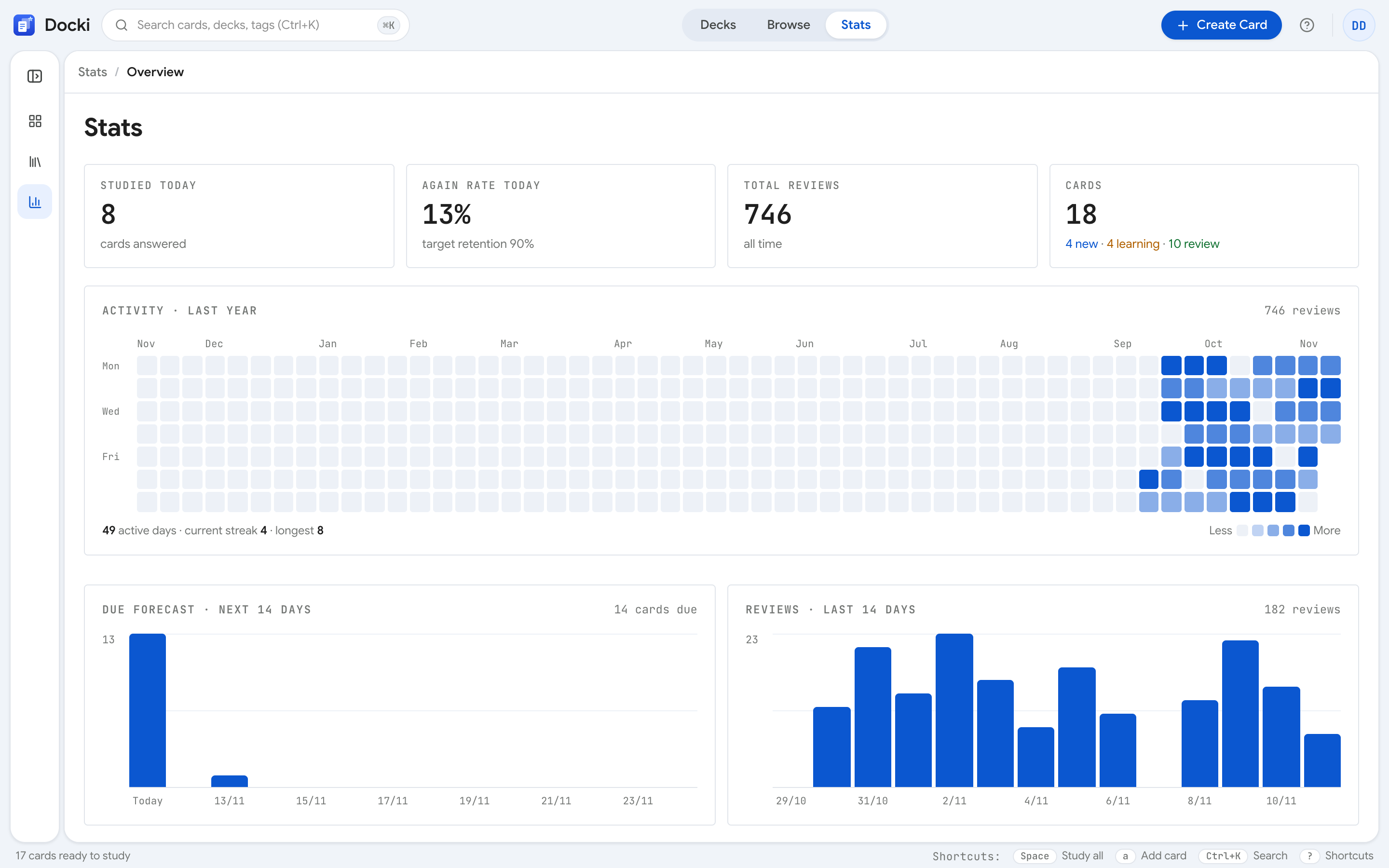 Figure 7: The Stats overview features four key metrics and the 14-day Due forecast chart.
1. Real-Time Performance Tiles
- Studied today: Total cards completed today.
- Again rate today: The percentage of cards graded Again today. If your Again rate hovers between 8% and 12%, your 90% retention target is performing accurately! If your Again rate spikes above 25%, your cards may be too complex or poorly worded.
- Total reviews: All-time cumulative review count.
- Cards by state: Real-time breakdown across New, Learning, Review, and Suspended states.
2. The 14-Day Due Forecast Chart
This bar chart projects the exact number of cards scheduled to fall due over the next 14 days. If you notice a heavy spike scheduled three days from now, you can proactively throttle your new card intake today to smooth out the upcoming peak.
3. Annual Activity Heatmap & Streaks
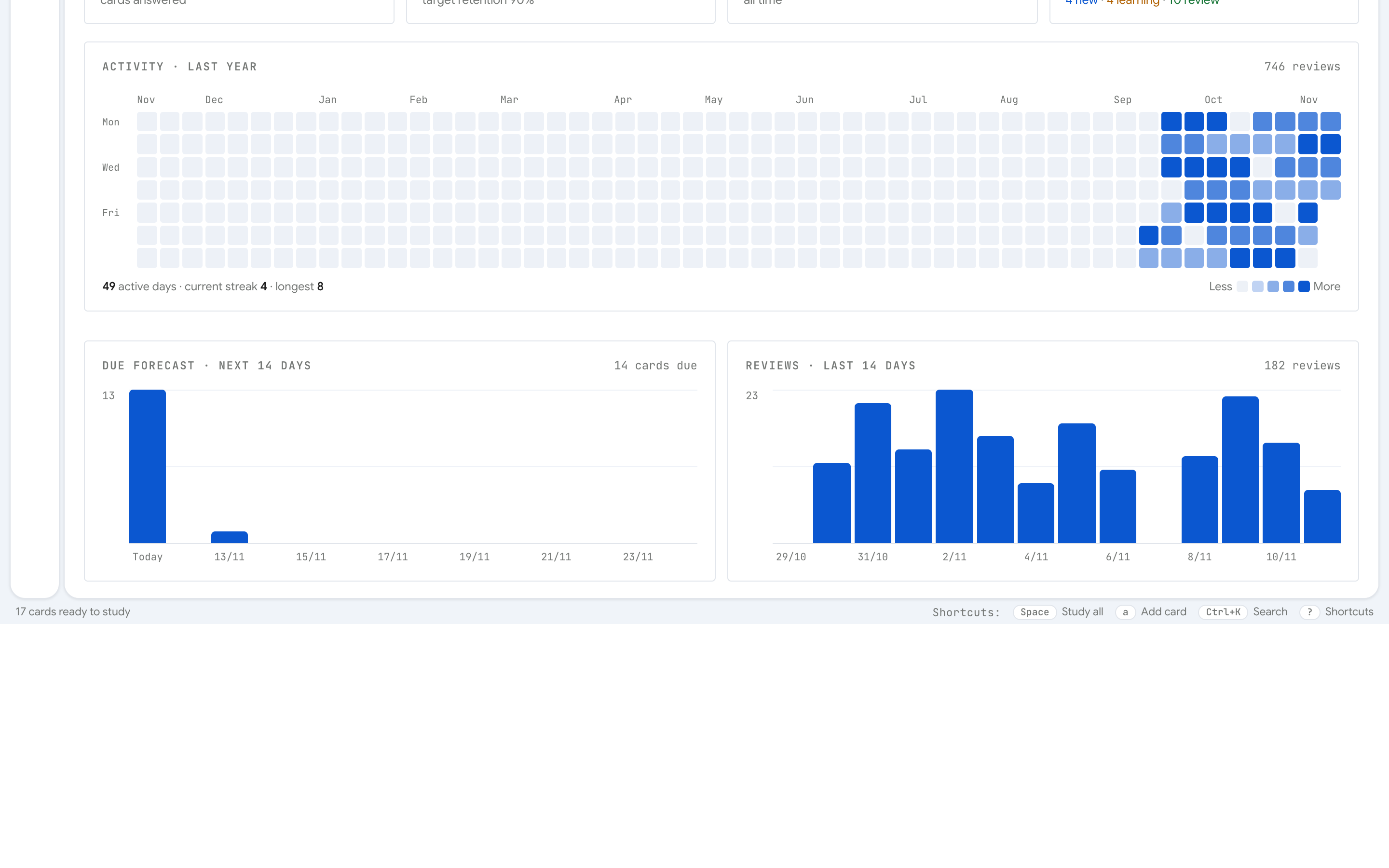 Figure 8: The 365-day Activity Heatmap visualizes your study consistency, reinforcing daily streak habits.
The heatmap displays a 365-day grid tracking your daily review volume with darkening green tiles, modeled after GitHub contribution charts. Maintaining an unbroken streak transforms spaced repetition from a chore into an automatic daily ritual.
Explore your stats interactively below:
8. Managing Difficult Cards (Leeches) in Browse
In any substantial flashcard collection, roughly 5% of cards become leeches — problem cards that you fail five, six, or seven times across several weeks. Leeches sap your motivation, inflate your review time, and clog your daily queue.
To eliminate them, press B to open the Card Browser (/browse).
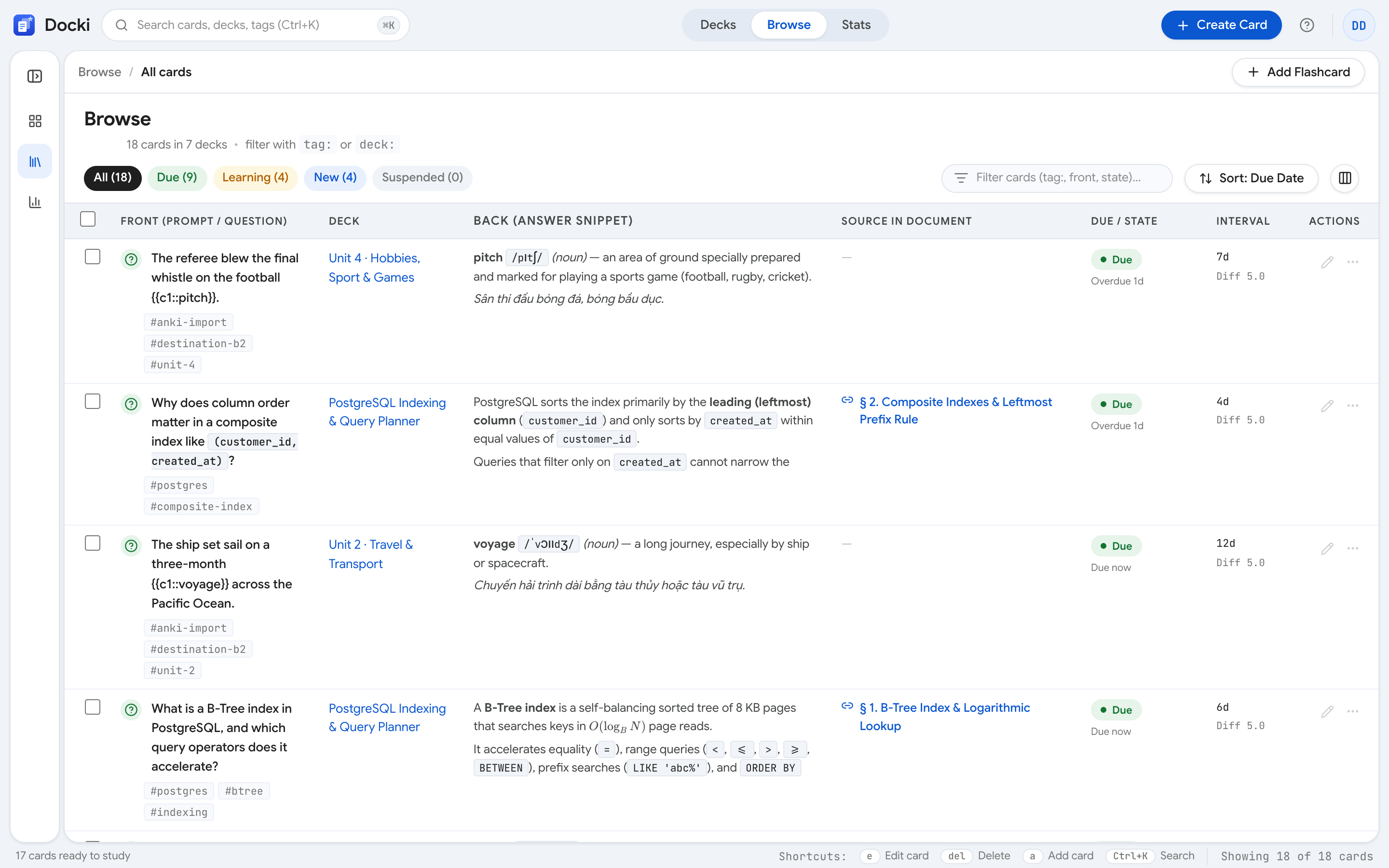 Figure 6: The Card Browser (/browse) lets you filter by status (All, Due, Learning, New, Suspended) and execute batch actions.
Filtering by Card Status
Use the top tabs to isolate specific segments of your collection:
All: Your entire card library.Due: Cards waiting for review right now.Learning: Cards currently undergoing short steps.New: Unstudied cards.Suspended: Inactive cards frozen from review queues.
Three Ways to Tame a Leech
When you spot a persistent problem card:
- Suspend: Click the pause icon to suspend the card. It turns gray and stops appearing in your review queues entirely. You can focus on your core cards now and revisit difficult edge cases later.
- Reset progress: Resetting the card wipes its failure history and converts it back into a brand-new card, letting FSRS re-estimate its difficulty from scratch.
- Edit & Atomize (Key
E): The ultimate cure for leeches. 90% of leeches fail because the question is too broad or the answer contains multiple disconnected facts. HitEto break the card into two concise atomic Q&A cards, attach an illustrative image, or add a helpful hint following the classic 20 Rules of Formulating Knowledge.
9. A Real-World 14-Day Routine (20 Minutes a Day)
Here is how Alex, a software engineer preparing for cloud architecture interviews, structured his daily Docki workflow over two weeks:
Initial Setup
- Deck: System Design & Cloud Architecture (400 total cards generated from documentation).
- Limits:
newPerDay = 20, target retention =0.90. - Schedule: 7:30 AM every morning with morning coffee.
Measured 14-Day Progression
| Day | New Cards | Due Reviews | Total Cards | Again Rate | Session Time | Milestones & Actions |
|---|---|---|---|---|---|---|
| Day 1 | 20 | 0 | 20 | 0% | 7 min | Read cards carefully, established baseline |
| Day 2 | 20 | 18 | 38 | 5% | 10 min | First reviews; 1 card repeated after 10 min |
| Day 4 | 20 | 36 | 56 | 8% | 13 min | Day 1 cards expanded to 3-day intervals |
| Day 7 | 20 | 68 | 88 | 9% | 18 min | Smooth flow using Space and 1–4 keys |
| Day 10 | 20 | 74 | 94 | 11% | 20 min | Caught two leeches; pressed E to split into cloze cards |
| Day 14 | 20 | 76 | 96 | 9% | 19 min | Workload reached steady-state plateau (~75–80 reviews/day) |
By Day 14, Alex had permanently internalized 280 complex concepts in under 20 minutes a day, with a predictable workload that never spiraled out of control.
10. Common Mistakes & Best Practices
- Overusing Easy: Don't press Easy just to dismiss a card. Reserve Easy for cards that require zero effort. Default to Good.
- Skipping Days and Cramming on Weekends: Missing three days creates an artificial backlog of 200+ cards. It is far better to do a quick 5-minute session of 30 cards every day than to spend two exhausting hours on Sunday.
- Studying New Cards Before Due Reviews: Always prioritize your Due queue. Protecting memories you have already invested in is infinitely more valuable than introducing new facts you might not retain.
- Fearing the Again Button: An Again rating is not a personal failure. It is the most valuable calibration signal you can give FSRS to protect your long-term memory.
11. Frequently Asked Questions (FAQ)
What happens if I miss a day and cards become overdue?
FSRS handles overdue reviews far better than legacy SM-2. When you review an overdue card and succeed (Good), FSRS recognizes that your memory trace was durable enough to survive the delay and rewards the card with a larger interval jump.
Can I undo an accidental rating?
Yes! Press Ctrl+Z (or click Undo in the header) immediately to revert the card to its previous state and submit the intended rating.
Why do mature, easy cards still appear after months?
Spaced repetition is built for lifelong retention. Even when a card's stability reaches 6 or 12 months, FSRS schedules an occasional review to prevent slow, unnoticed memory decay.
What is the optimal time of day to review cards?
Morning reviews take advantage of high mental energy and alertness, while a brief review before sleep leverages overnight memory consolidation during non-REM and REM sleep cycles.
12. Build Your 15-Minute Daily Habit
Spaced repetition is not a sprint; it is an effortless daily workout for your brain. With 15 minutes of disciplined, honest reviews each morning, you can master any language, exam, or professional skill with complete confidence.
- 👉 Try pre-built decks right now: Explore starter decks at /starter to see optimal card structures in action.
- 👉 Next in the series: Read our guide on Active Recall in Practice: 5 Ways to Train Your Brain Inside Docki to optimize your recall technique on the front of every card.
- 👉 Related reading:
Put this method to work in your own studying
Create study documents, extract flashcards with AI and review with FSRS spaced repetition on Docki, completely free.
Start for free